On this page
Before you start#
- You are signed in: tickets belong to your account, and to the personal, organisation or department context you created them in.
- Have the response of the failing call to hand. The value of its
X-Kong-Request-Idheader identifies the call. On a gateway with the newer response format, therequest_idin the body is the same value (errors and retries).
Steps#
- Note the
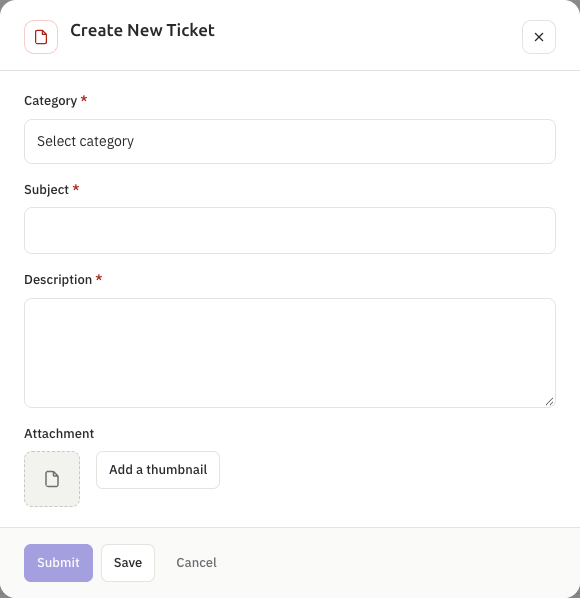
X-Kong-Request-Id, the time of the call in Saudi time (UTC+3), the product, the environment (Sandbox or Production), the app, and what you expected to get, not only what you got. - Open My Apps, then My Tickets, and press Create Ticket.
- Choose the Category: Inquiry or Technical Issue. These two names are in English on both language versions of the portal. Enter the Subject and the Description, and paste the details of step 1.
- Add an attachment if it helps: one file of the types PDF, DOC, DOCX, PNG or JPG, up to 50 MB. Never attach a key or a password.
- Press Submit to send the ticket to support, Save to keep it as a draft that you can finish later, or Cancel to close the form without saving.
Follow the ticket#
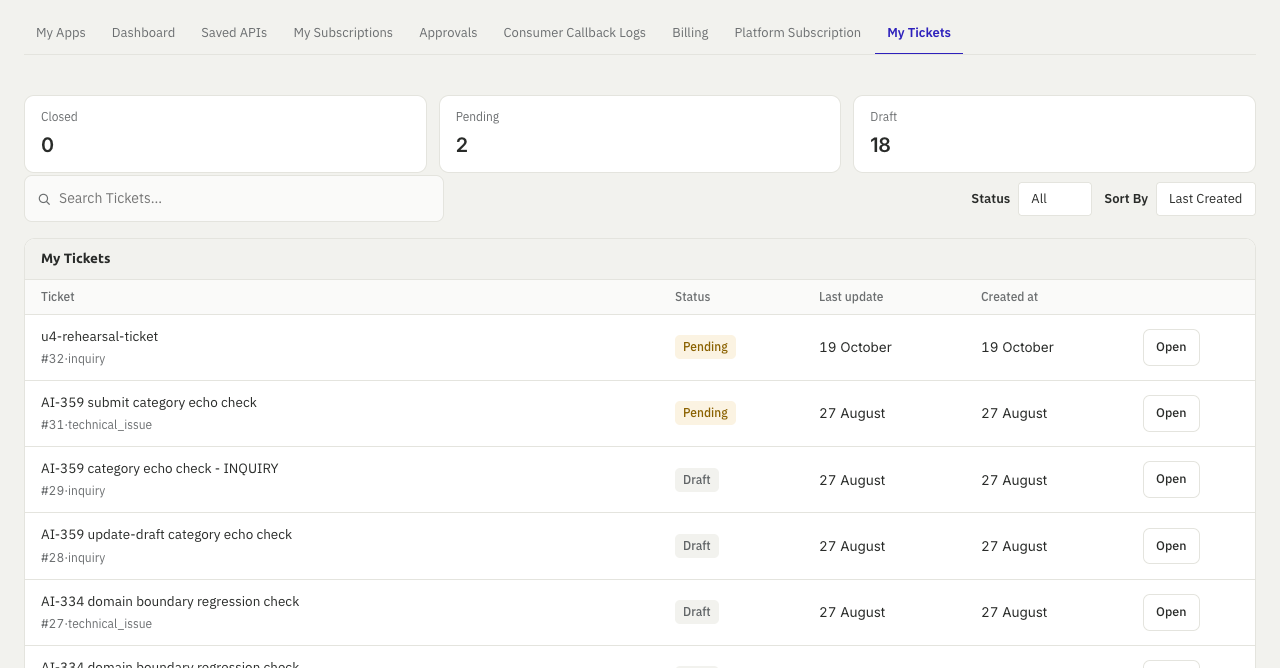
My Tickets lists your tickets, with the status Draft, Pending or Closed, and a search and a status filter. Open a ticket to read the conversation. While it is pending you can write a reply with Write Your Reply and Send, and you can cancel it with Cancel Ticket. The platform e-mails you when the status of a ticket changes, but not for every reply from support: open the ticket to read the replies. When a ticket is closed, you can rate the support you received once, from one to five stars.
Other ways to write to the platform#
The contact page is a form for general and business questions. It reaches the platform team by e-mail, and it is not a ticket: there is no status to follow and no reply in the portal. Use a ticket for anything about your account, a call or a payment.
Check that it worked#
The ticket appears in My Tickets with the number the platform gave it, for example #31, and with the status Pending. A draft shows as Draft until you submit it.
Questions people ask#
These come from the former help site (docs.api360.sa), answered for the platform as it is today.
How do products, versions and endpoints fit together?#
A provider publishes a product. A product has one or more major versions, and each version has endpoints. A call goes to the product's gateway address, then /v and the major version, then the endpoint's path. The product's page in the marketplace lists all three.
How do callbacks work?#
A product that answers asynchronously sends a callback to the address you configured for the endpoint. The portal keeps your callback settings and a log of what was sent. Events of the platform itself reach you as notifications (events and notifications).
Where do I see what I am charged?#
In Billing, under My Apps (payments and invoices).
If something goes wrong#
- No
X-Kong-Request-Idin the response means the call did not reach the gateway: check the address and your network first. - For
403,404and429, read errors, status codes and retries before you open a ticket: most have a fix on your side. - You cannot see My Tickets or Create Ticket: your role in this organisation lacks the applications permission. Ask your organisation admin.