On this page
- What you will do
- Before you start
- Step one: know the two environments
- Step two: take the gateway address from the product page
- Step three: use the key of the same environment
- Check that it worked
- Questions about the environments
- What is Production?
- What is Sandbox?
- When is KYC or KYB required?
- Is Sandbox free?
- Is the data in Sandbox real?
- Next steps
What you will do#
Learn which gateway address and which key go together, so that a call reaches the environment you meant and a refusal is easy to read. It takes a few minutes to read and nothing to set up.
Before you start#
You have an account (create one). Registration created two apps for you, Default App (Testing) and Default App (Prod), and each holds one key (apps and keys).
Step one: know the two environments#
An environment is a property of the app. You choose it once, when the app is created, and it never changes. The portal shows it as a tag on the app: Testing or Production.
| Sandbox | Production | |
|---|---|---|
| App type in the portal | Testing | Production |
| Gateway address | gate-test.api360.sa | gate.api360.sa |
| Key | the key of an app of type Testing | the key of an app of type Production |
| Data | what the provider set up for Sandbox: a test service of its own, or mock responses | live data from the provider's system |
| Offered by | products whose provider enabled Sandbox | every published product |
| Approval, KYC, KYB, licence | decided per product and plan, the same in both environments | the same |
The portal's own word for the Sandbox environment is Sandbox on a product page and in the playground, and Testing on an app.
A product appears in an environment only if its provider published it there. A product without Sandbox shows only Production in the environment switch of its page, and you cannot add it to a Testing app.
Step two: take the gateway address from the product page#
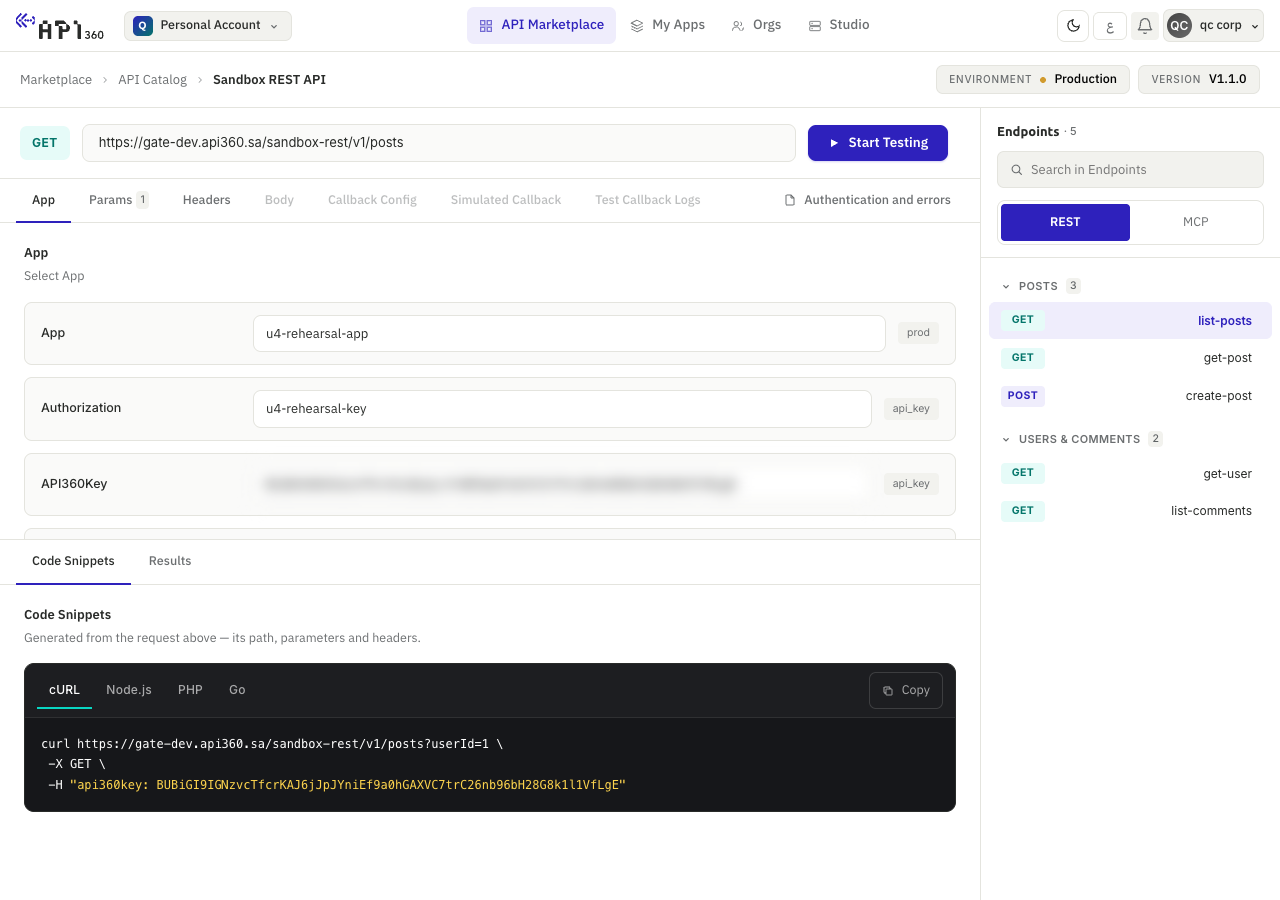
Each environment has its own address for each product, and the product page shows it. Open the product in the marketplace, choose the environment, and read the address in the Request URL of the playground or in the Call examples tab. A request goes to the address the page shows, then /v and the major version of the endpoint, then the path of the endpoint.
Step three: use the key of the same environment#
A key belongs to the app that owns it, so it belongs to that app's environment. A key of a Testing app is known only to the Sandbox gateway; a key of a Production app is known only to the Production gateway. A key sent to the other gateway is not recognised, so the call is treated as one with no key.
# one variable per environment, so a key in the wrong place shows at once
export SANDBOX_KEY="REPLACE_WITH_THE_KEY_OF_YOUR_TESTING_APP"
export API360_KEY="REPLACE_WITH_THE_KEY_OF_YOUR_PRODUCTION_APP"
You subscribe to a product once. When the provider enabled Sandbox for the product, that subscription gives access in both environments, and you add the product to the Testing app for Sandbox and to the Production app for Production (subscribe an app to a product).
Check that it worked#
- A call with the key of a Testing app to the Sandbox gateway reaches the product's Sandbox.
- The same key sent to the Production gateway, or a Production key sent to the Sandbox gateway, is answered with
403and{"message": "No active subscription for this product"}. The gateway gives the same answer for an unknown key, a wrong header name and an app that is not subscribed. When you meet it, check in this order: the host, the header nameapi360key, the key against the app of that environment, then the subscription (errors and retries).
# the key of the environment of API360_BASE_URL: the response is the product's own
curl -sS -o /dev/null -w "%{http_code}\n" "$API360_BASE_URL$API360_PATH" -H "api360key: $API360_KEY"
# an unknown key is answered like a call with no key
curl -sS -o /dev/null -w "%{http_code}\n" "$API360_BASE_URL$API360_PATH" -H "api360key: not-a-real-key"
Questions about the environments#
What is Production?#
The live environment, where real data and real payments are processed. Calls go to gate.api360.sa with the key of an app of type Production. Some plans need the provider's approval before your subscription becomes active.
What is Sandbox?#
The test environment of a product, for products whose provider enabled it. Calls go to gate-test.api360.sa with the key of an app of type Testing, and reach what the provider set up for Sandbox: a test service of its own, or mock responses.
When is KYC or KYB required?#
When the product asks for it. A provider can mark a product as requiring KYC or KYB, and subscribing to it, or renewing, is refused until your profile is complete. A member of an organisation whose account is active is not asked again. Products that do not ask need neither (your account).
Is Sandbox free?#
The platform does not charge a separate price for Sandbox: the product's own plan applies, and one subscription covers both environments. A provider can still price a product, so read the product's Pricing tab before you subscribe.
Is the data in Sandbox real?#
It depends on the provider. Sandbox returns what the provider configured, either a test service of its own or mock responses, and nothing on the platform guarantees that the data is fictional or stable. Read the product's description before you send real data.
A Sandbox key that needs no KYB and no payment, with fixed limits and published test data.